Your warehouse runs on Priority's WMS. Now you can also see where the work stopped.
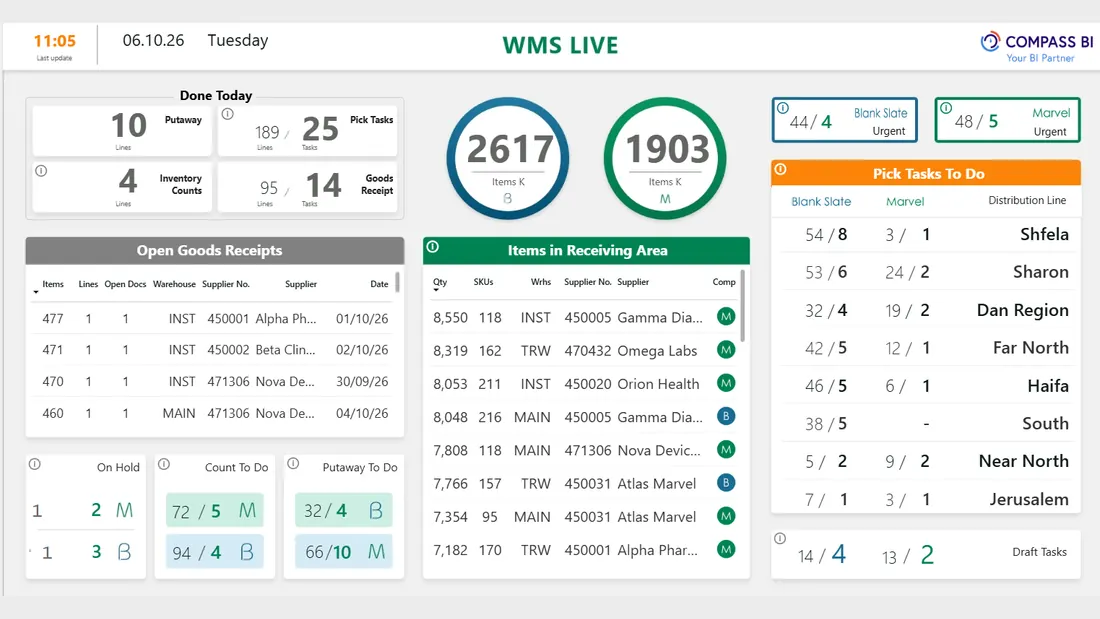
One dashboard for warehouse work by stage, receiving and picking, and what is still open at each of them. One current picture, while there is still time to respond.
For warehouses running Priority's WMS
If the warehouse reports on itself at the end of the day, you cannot see where the work stopped. Here you see tasks by stage, distribution line and station, and next to them what is missing and what needs to be ordered.
The data comes from Priority, and metrics are calculated once in the data warehouse, so the numbers stay consistent across every report.
Warehouse Management (WMS)
The problem
The warehouse reports on itself at the end of the day - did we get through it or not. What stays invisible is where the work stopped: a pick waiting, a shipment that did not leave, a count that was never closed.
The solution
One module that shows warehouse work by stage - receiving and picking - and what is still open at each of them, by distribution line and station. For warehouses running Priority's WMS.
What you see
Tasks done today · open goods receipts · items in the receiving area · picking tasks by distribution line · task status
Inventory & Procurement Forecasting
The problem
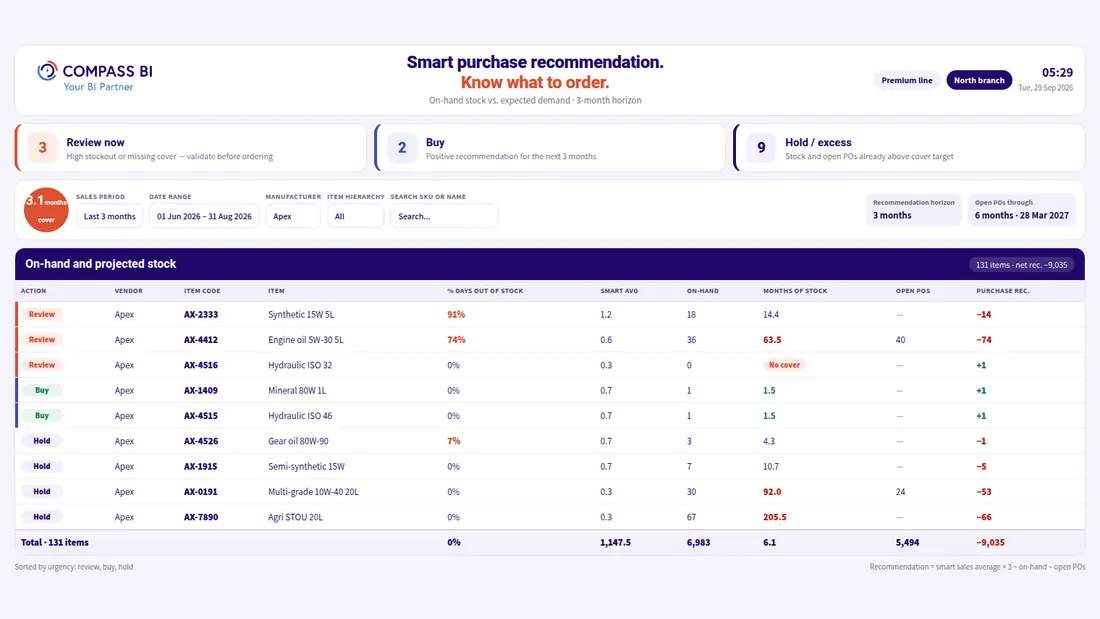
Stock usually gets checked once something has already run out, and at the same time money sits on the shelf in items that do not move - and the two problems never appear in the same report.
The solution
One module that combines stock on hand, sales velocity and open orders into a recommendation for every item, for a three-month horizon: order, check, or don't order. Urgent rows come first, and the formula is on display.
What you see
Three counters: to check, to order, surplus · items by urgency · a purchase recommendation per SKU · filters by manufacturer, hierarchy and horizon
Connect in one day. Live within weeks.
- Connect to Priority. No changes to your ERP processes.
- Choose a first module. WMS or inventory and procurement, whichever is more pressing.
- Go live. Dashboards on one data warehouse, with consistent numbers across every report.
Frequently asked questions
What does the WMS dashboard show?
Tasks done today, open goods receipts, items in the receiving area, picking tasks by distribution line and task status.
How do you connect, and how long does it take?
You connect to Priority without changing any processes in the ERP. You connect in one day and go live within weeks. You start with a first module: WMS or inventory and procurement, whichever is more pressing.
Who is it for?
For warehouses running Priority's WMS. Instead of the warehouse reporting on itself at the end of the day, you see tasks by stage, distribution line and station.
How do we start?
Leave your details in the form and we'll get back to you within one business day. You can also start by seeing what it looks like.
- An official Priority technology partner since 2021.
- 20+ years of experience.
- Dozens of managers make decisions through us.
We'll Get Back to You Within One Business Day
We've got your inquiry
We'll come back to you within one business day. If it's urgent, here are the fast routes:
That didn't send
Something went wrong on the way to us and the inquiry was not sent. You can try again, and reach us directly: